


Hailuo AI: Image&Video Maker
3.41.10K Reviews
App Specs
- Version
- 2.22.1
- Updated On
- License
- Free
- Downloads
- 10,000,000+
- Developer
- MiniMax AI
- Categories
- Photography
- Platform
- Android, iOS
Screenshots
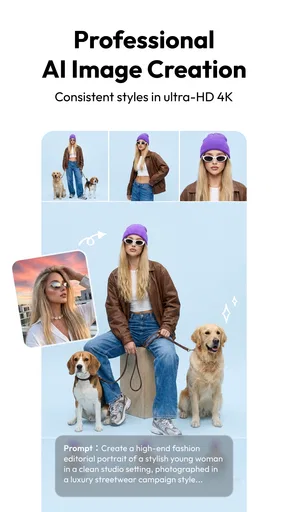
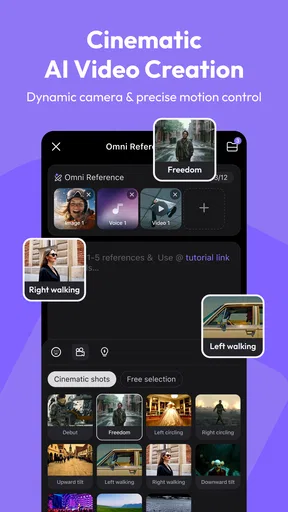
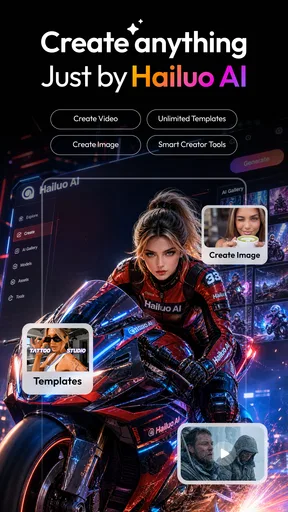
 Analysis by AppCompare
I reach for Hailuo AI: Image&Video Maker when I want to turn a visual idea into something shareable without first learning a complicated editing suite. It is a photography app from MiniMax AI, and its appeal is the mix of image tools and video creation in one place. I would treat it as a creative starting point rather than a replacement for every specialist editor: it is most useful when speed and a polished look matter more than precise, frame-by-frame control.
Getting Started with Hailuo AI
When I first opened Hailuo AI: Image&Video Maker, I was welcomed by an intuitive interface. Seriously, it’s like they designed it with the average user in mind. You don't need to be a tech wizard to navigate through the features. Everything is laid out clearly, and you can jump right into creating your masterpiece within minutes. No more endless scrolling to find what you need!
The app offers a quick tutorial when you first begin, which I found super helpful. It walks you through the basic functions like selecting templates, adding text, and choosing effects. Trust me, this little guide is worth your time if you want to get the most out of the app.
For a first project, I would keep the brief simple: choose one visual direction, make a single image or short clip, and adjust only the details that noticeably improve it. That makes it easier to judge what the AI is contributing instead of changing several things at once. It is also a practical way to learn the controls before investing time in a more elaborate piece.
One useful habit is to prepare your wording before opening the editor. A clear description of the subject, mood, and intended use gives you a better creative target than a vague request such as “make it stylish.” If the first result feels off, I would change one part of the instruction at a time. That makes each attempt more informative and helps avoid a cycle of random tweaking.
Features That Stand Out
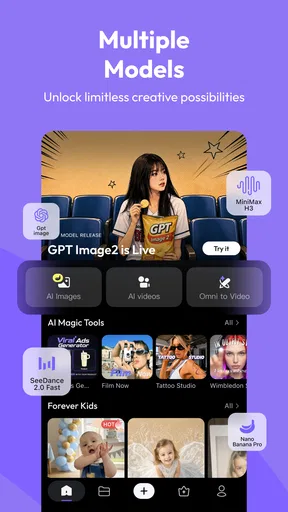
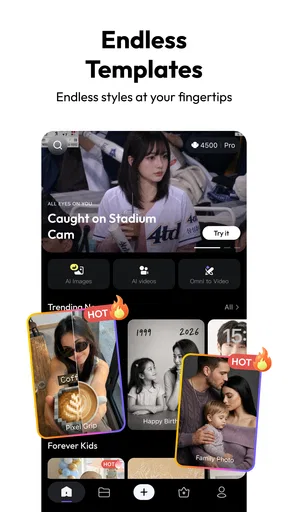
One of the coolest things about Hailuo AI is its massive library of templates. Whether you’re making a social media post or a cinematic video, the templates help you start on third base instead of at home plate. There are so many styles to choose from, it’s like having a personal designer at your fingertips.
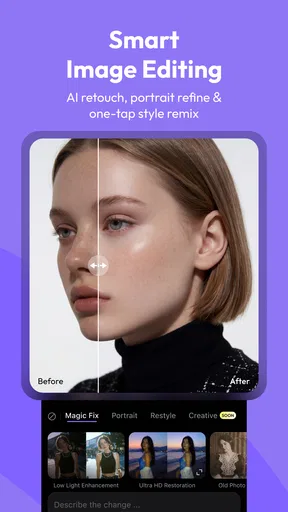
The app shines with its AI-powered editing tools. With just a few taps, you can adjust lighting, apply filters, and even enhance your images with effects that look like they came straight out of a professional studio. The AI does most of the heavy lifting, so you can focus on being creative.
Worth Reading Before You Choose

Baby Panda World Brings Quick Play to Modern Phones, but Its Game Library Feels Busy

ESPN’s Live Game View Makes Following Close Games Easier

QuizzLand Review: A Good Fit for Short Trivia Breaks, Not Every Player

Basketball Stars: Multiplayer Is Fast, but Can It Recover When Matches Go Wrong?

WEBTOON Turns Phone Updates Into a Better Reading Routine

Link to Windows Runs on Shared Habits, Not Social Feeds
Adding text to your images and videos is a breeze. The font choices are diverse, and you can tweak the size, color, and style to fit your project perfectly. It’s like a playground for typography enthusiasts!
Templates are especially handy when I know where an image will appear but do not yet have a strong layout in mind. I would use one to establish a rough composition, then simplify it if the result feels crowded. A template can make a post look finished quickly, but it can also make different projects feel alike if I accept every default. Changing the wording, color choices, or visual emphasis is a small step that gives the final piece more of my own character.
For text-heavy designs, I would check the result at the size people will actually see it. A title that looks elegant on a large preview may be hard to read in a small social feed. Keeping the message short and giving it visual space often matters more than trying another decorative font. This is one place where a quick manual adjustment can make an AI-assisted design feel much more intentional.
Creating Videos Made Easy
Not just an image editor, Hailuo AI excels in video creation too. You can stitch together clips, add transitions, and overlay music tracks with ease. The timeline feature is straightforward, making it easy to rearrange clips until your video flows just right. I made a short video for social media, and it turned out looking like something a pro would make.
The music library is quite extensive. Whether you're looking for something upbeat or mellow, there's something for every mood. And if you have your own tracks, you can easily upload them. The audio editing tools let you trim and adjust tracks to get everything just the way you like it.
A realistic use for that combination is a small event recap: select a few moments, put the most important one near the beginning, and use music to connect the clips rather than letting effects compete for attention. I find that a simple sequence is often more watchable than a montage with a transition on every cut. If the video is meant to communicate information, I would make sure the text remains readable long enough to be understood.
When a video is taking longer than expected, I would avoid making several edits in parallel or repeatedly restarting the same export. Video work can be heavier than adjusting a still image, and a complex project is naturally a different test from a quick filter change. Saving or keeping a clear version of the edit before experimenting also makes recovery less stressful if a change takes the clip in the wrong direction.
Performance and Usability
Now, I know what you’re thinking—does all this make the app laggy? Surprisingly, no! The app runs smoothly without any significant hiccups. I used it on both my Android and iOS devices, and it performed consistently well on both platforms. That’s a big win in my book.
One thing I noticed is how quickly the app processes edits. Whether I was rendering a video or saving a high-resolution image, everything was done in a snap. No more waiting around while the progress bar inches forward.
Even so, I would set sensible expectations for speed. A small image adjustment and a video export are not equivalent workloads, and the amount of material in a project can affect how patient I need to be. If I am creating something for a deadline, I would leave time to review the finished file rather than assuming that every stage will be instant. That final check is useful for catching an awkward crop, a text placement that shifted, or an audio level that does not suit the clip.
For heavier sessions, I would work in short passes: settle the visual direction first, then refine text, then finish the video details. This reduces needless reworking and makes it easier to spot which change caused an unwanted result. It is a workflow tip, not a promise that every device will respond identically; mobile performance depends on the project and the phone or tablet being used.
Choosing It for the Right Job
Hailuo makes the most sense for someone who wants one approachable place to explore AI-assisted visuals and assemble a presentable short video. A small business owner could use it to draft a quick promotional visual, while a casual creator might make a themed post or a recap for friends. I would also recommend it to people who enjoy experimenting but do not want to begin with a desktop editing workflow.
I would choose a different tool if the project depends on exact brand consistency, detailed control over every layer, or a carefully managed professional video timeline. A dedicated photo editor is generally a better fit for pixel-level corrections, while a specialist video editor is preferable when precise audio mixing and complex sequencing are central. Hailuo’s strength is lowering the barrier to making something attractive, not replacing that depth.
Compared with a conventional photo editor, its AI-oriented approach can help me get from an idea to a stylized image with less manual setup. Compared with a basic video editor, the combination of templates and image creation gives more room to begin from a look rather than raw footage. The trade-off is that a fast starting point does not guarantee the exact result I pictured; I still need to review composition and make deliberate choices instead of treating the first output as final.
Cost, Compatibility, and Everyday Fit
The app is free to download, and its content rating is Everyone, which makes it broadly accessible. It has a 4.2 average from around 60,000 ratings and more than 5 million installs, so it has attracted a substantial audience. Its current version is 1.37.2, and it requires Android 7.0 or later. In-app purchases range from $5.00 to $767.99 per item, so I would check the cost of any optional purchase carefully before committing; a free download does not mean every creative option is free.
For an everyday example, imagine I have a few photos from a weekend outing and want a compact recap for a group chat. I could start with a template, keep the text to a short caption, arrange a handful of clips, and choose music that supports the mood. The key is to decide whether I need an image or a video before I start: trying to force one format into the other can waste time, while a clear purpose keeps the project focused.
If you are wondering whether it is suitable for regular use, I would base that decision on the kind of output you make and how often you run into purchase prompts or workflow limits that matter to you. The app’s no-cost entry point is useful for trying its style, but anyone planning frequent or demanding work should review the in-app purchase choices against their own needs. I would not buy anything just because a project feels unfinished; first check whether a simpler template, shorter edit, or clearer prompt solves the problem.
Where I’d Draw the Line
AI-assisted creation still calls for judgment. A result can look polished yet miss the point of the image, and decorative effects may distract from a message that should be clear. I would inspect faces, edges, text, and the overall crop before sharing, especially when the image represents a real person or a business. The convenience is real, but it does not remove the need to decide whether the finished piece is accurate and appropriate.
Reliability also means having a calm fallback. If an edit or export does not go as expected, I would return to the last version I was happy with and simplify the project rather than repeatedly layering changes onto an uncertain result. For important work, keeping the original photos and clips untouched is sensible whichever editor I use. That way, Hailuo can remain a creative workspace rather than the only copy of material I care about.
Final Thoughts
In the end, Hailuo AI: Image&Video Maker is a fantastic tool for anyone looking to create stunning visuals without breaking a sweat. It combines powerful features with ease of use, making it accessible to both beginners and seasoned creators alike. The app is a one-stop shop for all your creative needs, and it’s definitely worth checking out.
If you’re ready to unleash your creativity, you can download the app on both Android and iOS. Happy creating!
Pros
- User-friendly interface for quick editing.
- Wide range of filters and effects.
- High-quality output for both images and videos.
- Fast processing time with minimal lag.
- Regular updates with new features.
Cons
- Limited free features; many require purchase.
- Occasional ads can interrupt workflow.
- Some effects require high-end devices.
- No offline mode available for editing.
- Exporting can be slow for large files.
FAQs for Hailuo AI: Image&Video Maker
What is Hailuo AI: Image & Video Maker?
Hailuo AI: Image & Video Maker is a creative application that allows users to generate high-quality images and videos using artificial intelligence. It provides a wide range of tools and templates to help users create visually appealing content, whether for personal use or professional projects.
How user-friendly is Hailuo AI for beginners?
Hailuo AI is designed with a user-friendly interface that caters to both beginners and experienced users. The app offers tutorials and guided steps for creating content, making it easy to navigate through the various features and tools. Beginners will find the learning curve manageable and intuitive.
What are the key features of Hailuo AI?
Key features of Hailuo AI include AI-driven image and video creation, a library of templates, customizable design elements, and advanced editing tools. The app also supports various file formats and provides options to enhance and personalize content, ensuring users can create professional-quality visuals with ease.
Are there any in-app purchases or subscriptions?
Yes, Hailuo AI offers in-app purchases and subscription plans that unlock additional features and premium content. Users can choose from different tiers based on their needs, allowing access to exclusive templates, advanced editing tools, and enhanced AI capabilities. It's important to review these options before downloading.
Is Hailuo AI suitable for professional use?
Hailuo AI is well-suited for professional use, offering tools and features that meet the demands of content creators, marketers, and designers. The app’s ability to produce high-quality visuals efficiently makes it a valuable asset for professional projects, providing a competitive edge in content creation.


